

Arduino Code Syntax Highlighting Plugin for your WordPress Blog
 August 13th, 2011 |
  Author: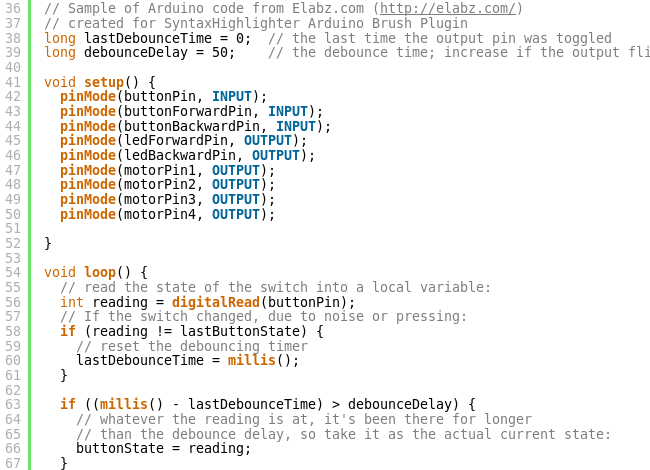
Arduino Brush for SyntaxHighlighter Plugin - sample of output
It this kind of color markup that I wanted for the code posted on this site. Enter SyntaxHighlighter Evolved WordPress plugin
Thanks to Alex ( AKA Viper007Bond ) who wrote this plugin, which itself is based on the SyntaxHighlighter JavaScript package by Alex Gorbatchev, I’ve found an easy way to mark Arduino code I post here. Adding a custom piece of code to the plugin (called “brush”) required writing yet another mini-plugin for WordPress but Alex provided ample instructions for adding a new brush and here is what came out of my efforts:
Download SyntaxHighlighter Evolved: Arduino Brush 
Basically, the idea behind this Arduino code markup plugin was to be able to create Web pages very similar to the look and feel of the standard Arduino IDE – same colors at the very least. I have to admit, I took some small liberties with copying the markup and added bolding and colors for some elements that I thought deserved it but didn’t get any in Arduino IDE. Direct port manipulation functions (PORTD, DDRD etc.) are one such example. Otherwise I hope the code looks and feels just like you’re still editing it in Arduino IDE 🙂
INSTALLATION INSTRUCTIONS
- This plugin depends on the main SyntaxHighlighter Evolved plugin. Please download and install the plugin according to the author’s instructions.
- Unzip content of the Arduino Brush archive into a temporary directory, then upload content of that directory (syntaxhighlighter-arduino) to your WordPress plugins folder (usually wp-content/plugins/).
- Open Plugins in your WordPress Dashboard and activate both ‘SyntaxHighlighter Evolved’ and ‘SyntaxHighlighter Evolved: Arduino Brush’ plugins
- Go to the main plugin’s ‘SyntaxHighlighter Evolved’ Settings and in the “Color Theme” Select “Arduino”. No other changes from defaults are necessary. Save the new settings.
USAGE
- Use only in HTML mode of the WordPress Editor
- Wrap the piece of Arduino code you want to highlight in
[code lang="arduino"] [/code]
- If you don’t want the line numbers on the left, use an additional parameter in the [code] tag:
[code lang="arduino" light="true"] [/code]
EXAMPLE
	[code lang="arduino"]
	int digit_common_pins[]={8,9,10}; // This is my code, non-working sample
        int ledForwardState = LOW;
        PORTD = digits[digits_array[z]];
        digitalWrite(digit_common_pins[z], HIGH);
	[/code]
would render like
int digit_common_pins[]={8,9,10}; // This is my code, non-working sample
int ledForwardState = LOW;
PORTD = digits[digits_array[z]];
digitalWrite(digit_common_pins[z], HIGH);
and
	[code lang="arduino" light="true"]
	int digit_common_pins[]={8,9,10}; // This is my code, non-working sample
        int ledForwardState = LOW;
        PORTD = digits[digits_array[z]];
        digitalWrite(digit_common_pins[z], HIGH);
	[/code]
would render like
int digit_common_pins[]={8,9,10}; // This is my code, non-working sample
int ledForwardState = LOW;
PORTD = digits[digits_array[z]];
digitalWrite(digit_common_pins[z], HIGH);
If you wanted to highlight lines 2 and 3 for example, add highlight=”2,3″
	[code lang="arduino" highlight="2,3"]
	int digit_common_pins[]={8,9,10}; // This is my code, non-working sample
        int ledForwardState = LOW;
        PORTD = digits[digits_array[z]];
        digitalWrite(digit_common_pins[z], HIGH);
	[/code]
would render like
int digit_common_pins[]={8,9,10}; // This is my code, non-working sample
int ledForwardState = LOW;
PORTD = digits[digits_array[z]];
digitalWrite(digit_common_pins[z], HIGH);
For more complicated and real world examples of Arduino code marked up with this plugin, please see my earlier posts: Arduino Nano and HP5082-7433 vintage 7-segment LED display or Driving a Bipolar Stepper Motor with Arduino and ULN2803AG
Special thanks to Darius of electronicsblog.net who’s usage of SyntaxHighlighter inspired me to write this plugin.
Please leave any question or comment about this plugin in the comments section below.
Thanks for stopping by and happy coding!
 Posted in
  Tags:
Tags:
Thank you very much!!! Works Great.
Im using PHP 5, so I had to change the ‘<?' tag for '<?php' tag at the beginning of syntaxhighlighter-brush-arduino.php
Hi Guillermo, thanks for stopping by! I’m glad you were able to use it! The PHP opening tag (<? vs. <?php ) actually has to do with your Web server rather than the PHP version. But you are right, I should keep in mind that not everyone uses Apache for their Web server. <?php is more widely accepted.
Thanks again!
[…] Code here is formatted by using Arduino Code Syntax Highlighting Plugin. […]
Thanks for this great brush, it’s make code very nice !
[…] Brush by: Elabz.com […]
I realise that this post is quite old now and may not be monitored but just in case: I am wondering if it is possible to use this Arduino Code Syntax Highlighting Plugin in normal html markup and if so how would I implement it please. I did use on my site when I was using WordPress but now I have moved to a self coded site and the “copy as html” function in the Arduino IDE uses a lot of non breaking spaces and whilst it renders very well I am just after a more elegant solution. Thanks Pedro
Thanks for stopping by, Peter.
Sure you can deploy the Syntax Highlighting javascript in a plain HTML file. It’s just an adaptation of an open source library from here: http://alexgorbatchev.com/SyntaxHighlighter/ to WordPress. I just wrote a little addition that implements highlighting of Arduino-specific (or, more generally, Wiring-specific, because Arduino IDE is based on Wiring). It’s basically a custom CSS file (and making sure your JS is calling that file)
You are more than welcome to grab that additional part from my site – open the source of any page and find the part that deals with custom CSS – search for http://elabz.com/wp-content/plugins/syntaxhighlighter/syntaxhighlighter3/styles/shCore.css?ver=3.0.83c and copy/paste what you need to your own site (static HTML or template other than WP – just be sure to follow the syntax conventions of the platform you end up using)
I haven’t done that myself yet but it looks totally doable.
Ironically, I am a bit tired of WordPress myself and looking around for an alternative blogging platform, but I do like Syntax Highlighter, so I may very well be trying to do what you’re attempting now at some point in the future myself.
Good luck!
Oh, one other thing: if you successfully deploy it in a static HTML, please drop me a link, I would love to see how it worked
[…] по разным системам и WordPress в частности нашел статью о подсветки синтаксиса именно Arduino в WordPress. Основой для […]